
Running a Process
#include <process/psProcess.hpp>
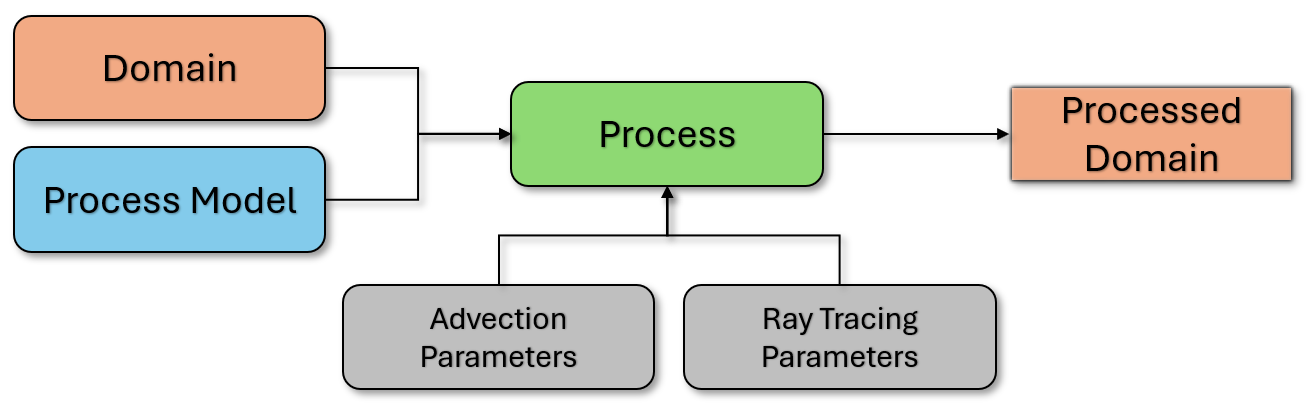
The Process class is the main simulation interface. It holds the domain, the process model, the duration, and advanced parameters. Configure it, then call apply(). The passed domain is modified in place.
Example usage
C++
// namespace viennaps
using T = double;
constexpr int D = 3;

auto process = ps::Process<T, D>();
process.setDomain(myDomain);
process.setProcessModel(myModel);
process.setProcessDuration(10.0);

// Flux engine selection
process.setFluxEngineType(ps::FluxEngineType::AUTO);

// Optional parameters
ps::AdvectionParameters adv;
adv.timeStepRatio = 0.25;

ps::RayTracingParameters rt;
rt.raysPerPoint = 500;

ps::CoverageParameters cov;
cov.maxIterations = 10;

ps::AtomicLayerProcessParameters alp;
alp.numCycles = 2;

ps::SurfaceDiffusionParameters sd;
sd.kNeighbors = 16;

process.setParameters(adv);
process.setParameters(rt);
process.setParameters(cov);
process.setParameters(alp);
process.setParameters(sd);

// Run
process.apply();
Python
import viennaps as vps

process = vps.Process()
process.setDomain(myDomain)
process.setProcessModel(myModel)
process.setProcessDuration(10.0)

# Flux engine selection
process.setFluxEngineType(vps.FluxEngineType.AUTO)

# Optional parameters
adv = vps.AdvectionParameters()
adv.timeStepRatio = 0.25

rt = vps.RayTracingParameters()
rt.raysPerPoint = 500

cov = vps.CoverageParameters()
cov.maxIterations = 10

alp = vps.AtomicLayerProcessParameters()
alp.numCycles = 2

sd = vps.SurfaceDiffusionParameters()
sd.kNeighbors = 16

process.setParameters(adv)
process.setParameters(rt)
process.setParameters(cov)
process.setParameters(alp)
process.setParameters(sd)

process.apply()
Process parameters
All advanced process parameters are set via setParameters(...). These parameter structs are not templates in C++; only Process takes numeric type and dimension arguments. Model-specific parameters are set on the model.
Flux engine
Select the flux computation method at runtime.
// C++
process.setFluxEngineType(ps::FluxEngineType::AUTO);       // default
// or: CPU_DISK, CPU_TRIANGLE, GPU_DISK, GPU_LINE, GPU_TRIANGLE
# Python
process.setFluxEngineType(vps.FluxEngineType.AUTO)  # default
# or: CPU_DISK, CPU_TRIANGLE, GPU_DISK, GPU_LINE, GPU_TRIANGLE
AUTO selects a GPU engine when a GPU is available and the model provides a GPU implementation: GPU_DISK for periodic domains and GPU_TRIANGLE otherwise. It falls back to CPU_DISK when those conditions are not met. CPU_TRIANGLE is available for triangle-based CPU tracing. GPU engines require a build with GPU support and a compatible model.
Flux engine selection is separate from the oxidation solver’s GpuMode.
Single-pass flux calculation
SmartPointer<viennals::Mesh<NumericType>> calculateFlux()
Computes flux for the current configuration without advancing the geometry and returns a disk mesh with flux arrays in its cell data. The selected model must use a flux engine. In C++, with a triangle engine, getTriangleMesh() also returns the per-triangle flux mesh from the last calculation; otherwise it is null.
Volume processes
Ion implantation and annealing operate on the domain’s cell set. Create it before applying either model and pass zero as the Process duration. The callback runs once; configure implant dose or anneal duration on the model itself. These processes update volume fields without advecting the level sets.
Member functions
Constructors
// Default
Process()

// From domain
Process(SmartPointer<Domain<NumericType, D>> passedDomain)

// From domain, model, and duration
template <typename ProcessModelType>
Process(SmartPointer<Domain<NumericType, D>> passedDomain,
        SmartPointer<ProcessModelType> passedProcessModel,
        const NumericType passedDuration = 0.)
Set the domain
void setDomain(SmartPointer<Domain<NumericType, D>> passedDomain)
Set the process model
void setProcessModel(SmartPointer<ProcessModel<NumericType, D>> passedProcessModel)
Set the process duration
void setProcessDuration(NumericType passedDuration)
Set parameters (unified)
void setParameters(const AdvectionParameters&)
void setParameters(const RayTracingParameters&)
void setParameters(const CoverageParameters&)
void setParameters(const AtomicLayerProcessParameters&)
void setParameters(const SurfaceDiffusionParameters&)
Set flux engine type
void setFluxEngineType(FluxEngineType type)
Set intermediate output path
Path for writing intermediate results, if enabled. See Logging for details.
void setIntermediateOutputPath(const std::string &path)
Run the process
void apply()